
|
Technology
Topics |
FtpFile transfer protocol (ftp) allows files to be transferred between computers. This page tells you how to use ftp. I use it, for example, to share photographs and to update websites, as it makes it much easier to transfer multiples files at a time. Ftp is not subject to email limitations (emails are typically limited in size to about 10MB (25MB for Gmail, Yahoo, and Windows live), and due to the way emails are encoded files, especially photographs, take up more space than their actual size). Using ftp with a browser or Windows explorerI recommend using a ftp client, but you can use a browser such as internet explorer, or windows explorer, as follows.
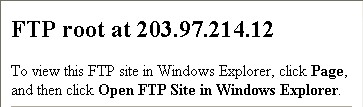
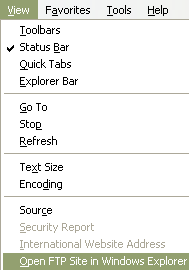
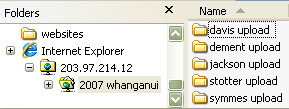
Using ftp with a ftp clientThe windows ftp client I use is FileZilla(approve sites). For a Mac you could try (I haven't) Cyberduck(approve sites). It is easy to download and install.
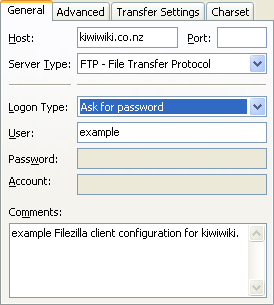

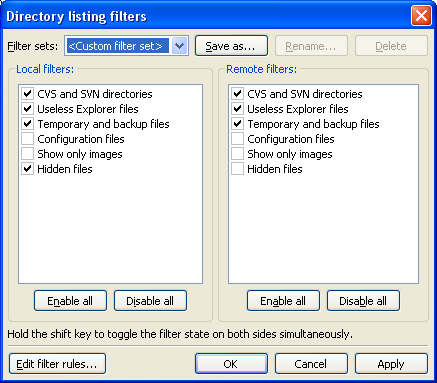
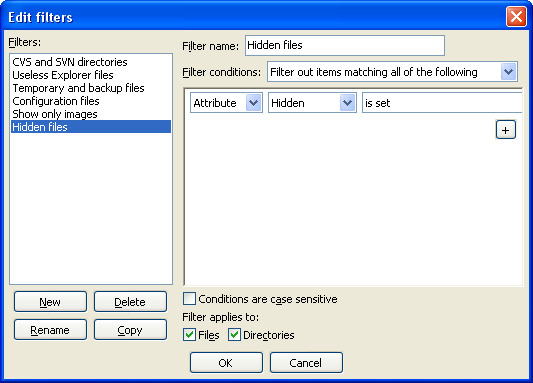
Advanced filezilla settingsFilename filtersTo avoid uploading or downloading system and hidden files set up a filter.
|
tahi Page last modified on 2012 Mar 05 20:17
Edit - History - Recent Changes - WikiHelp - Search - email page as link -> mailto:?Subject="KiwiWiki: Ftp"&Body=

 to open the ftp connection